Installation Instructions
The following instructions will assist you in installing the programs that
are released by Abbydale Systems LLC.
If you follow these instructions the program/product/facility will be uploaded to your system
and be ready for implementation.
Please feel free to print these instructions.
|
|
|
| Step 1 |
Download the XMI fileMost of our code is distributed as a binary XMI file. You will need to download and save the code to a PC. |
| Step 2 |
Upload the XMI file to the Target z/OS SystemFile transfer the XMI file downloaded in Step 1 up to the target z/OS system as a binary file. The XMI file must be transferred as a binary file otherwise the file will be corrupt. |
| Step 3 |
RECEIVE the Transferred FileIssue the TSO RECEIVE command for the file that was transferred to the target system. RECEIVE your.uploaded.file.XMI |
| Step 4 |
Run the UNPACK member of the Received DatasetThe UNPACK member of the received dataset will extract the required datasets that comprise the program. Follow the prompts issued by the UNPACK member and all the required datasets and a PDF dataset (if available) will be allocated and populated with all of the required components. To execute the UNPACK member either put an EX next to the member i.e. 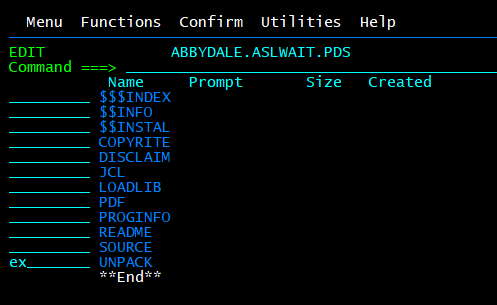
Alternatively issue the execute as you would any other REXX exec. i.e. TSO EX ' your.received.dataset(UNPACK)' |
| Step 5 |
Read the $$INSTAL Member to Complete the InstallationThe $$INSTAL member of the received dataset contains instructions of how to complete the installation of the program. The implementation will differ depending on the site standards but essentially you need to make the libraries available to the users. |
| Step 6 |
(Optionally) Download the PDFTo download the PDF file transfer it to a Windows based operating system as a binary file with a .PDF extension. Once it is on the Windows system it should be able to be read as a PDF. Alternatively you can download the PDF directly from link above. |
It is the responsibility of any user of this material to evaluate its usefulness to the user's environment.
Abbydale Systems LLC. does not guarantee to keep this or any related material current, nor does it guarantee to provide any corrections or extensions described by any users of this material or any corrections or extensions made in the future by Abbydale Systems LLC. itself.