As ever, you use this free program at your own risk.
Feel free to use the free software on this site but please honor the copyright.
DATEGET is a Rexx and ISPF facility that can be used to prompt a user
to enter a date.
This user will be prompted via a panel (ASLDTE01) which will validate
the validity of the date entered.
The year portion of the date must be between 1960 and the current year.
These can by changed in the panel if you need to.
Note: that future dates that are within the current years are permitted.
There is also a Rexx exec named DATETEST which demonstrates how to call
the DATEGET rexx exec.
DATEGET sets a value, via a PUSH, named "mydate" back to the calling exec.
This is in the format 'yyyymmdd xxx
'. The "xxx" portion returns the
switch settings entered from the panel. These will be an "x" if the switch is
not set. If the
switch is set it will show as a "o" for ON, "b" for BEFORE and "a" for AFTER.
For example if the date enter was 9th November 1971 and the switch is set for
ON or BEFORE the result in mydate will be '19711109 obx'.
If you only want the date portion PULL the mydate variable and split it.
i.e. datepart = substr(mydate,1,8) /* gives the returned date */
yearpart = substr(mydate,1,4) /* gives the returned year */
monpart = substr(mydate,5,2) /* gives the returned month */
daypart = sunstr(mydate,7,2) /* gives the returned day */
The ASLDTE01 panel will display as a popup panel. The panel looks like:
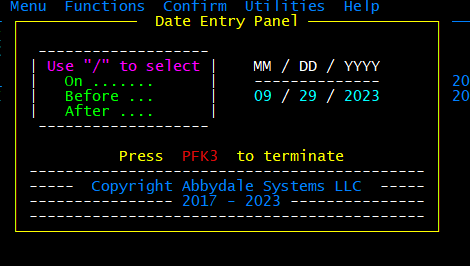
ASLDTE01 Panel
| Link |
Description | |
|---|---|---|
| This link will take you to a file that contains the XMI library containing the DATEGET facility. This file should be transferred to the z/OS system using a file transfer program. The file must be transferred as a BINARY file. | ||
|
|
||
Installation Instructions
For installation instructions click the button below.
This material has been used successfully by Abbydale Systems LLC. and to the best of our knowledge this material and any system(s) of which it is a part are operational as of the service level or date stated in the body of this material (if so stated). However, NO warranty is given or implied as to the accuracy of this material or any related material or systems, and no responsibility is assumed for any effect or modification directly or indirectly caused by the use of this material.
It is the responsibility of any user of this material to evaluate its usefulness to the user's environment.
Abbydale Systems LLC. does not guarantee to keep this or any related material current, nor does it guarantee to provide any corrections or extensions described by any users of this material or any corrections or extensions made in the future by Abbydale Systems LLC. itself.